
Prime Day Advertising: How to Turn Post-Event Traffic Into Profitable Sales
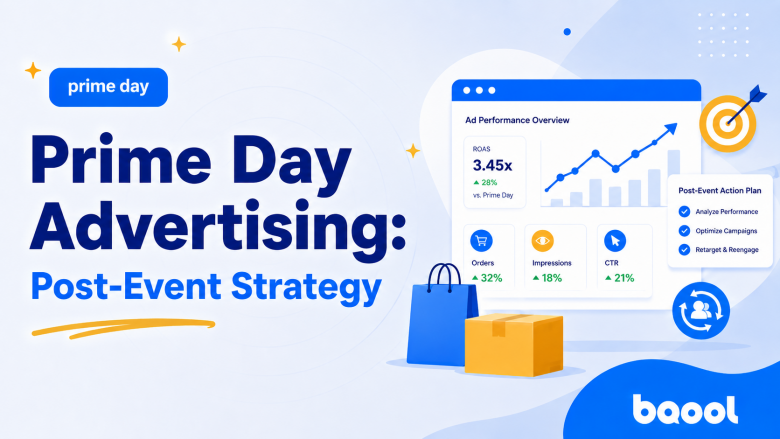
The biggest event of the year is over, but that doesn’t mean your Prime Day advertising strategy should end too. Post-Prime Day presents one of the most advantageous moments for sellers, where your ad budgets shift from a more aggressive, impression-driven approach to one that is more focused on profit, retargeting, and customer retention.
In this article, we guide you through how to navigate the post-peak environment on Amazon and how to tweak your Ads strategy for this period.
Overview
Quick Answer
Review your Prime Day data to identify which products and search terms have the potential to produce more sales even after your Prime Day promotions have ended. Keep high-performing campaigns live, reduce bids on search terms where conversions are dropping, and redirect ad spend toward high-intent audiences and moving products.
What Changes After Prime Day on Amazon Marketplace?
After Prime Day, shopper behavior does not “return to normal” the moment Prime Day ends. Many customers spend the event comparing products, reading reviews, visiting newly discovered storefronts, or saving products for later rather than buying immediately, allowing them to make a more considered purchase.
According to Digital Commerce 360, this is called the Prime Day “halo effect” where traffic and the increase in visits from shoppers during the event continue even after the deal window closes. For advertisers, this means that while post-event traffic may be smaller, it can be more qualified. Customers who have already interacted with your product page or brand are no longer cold prospects.
How Should Your Advertising Goals Change After Prime Day?
After Prime Day, focus more on which ads are helping you make sales instead of which ads are only getting lots of views. Impressions and clicks still matter, but they should not be the primary reason to keep spending. Your focus now should be on removing the search terms that gathered clicks but did not bring in any sales, reducing wasted ad spend.
What Should Sellers Adjust Their Amazon Ads Strategy After Prime Day?
1. Download and Review Your Search Term Report
The first thing sellers should do after Prime Day is over is download your search term report. The most valuable time to download this report is right after Prime Day ends or during the following week. Once you have this report in your hands, review which keywords, products, and campaigns generated sales and which ones only drove clicks.
2. Scale, Reduce, or Pause Campaigns
From there, organize your existing campaigns into two groups:
- Scale: Campaigns that maintained strong conversion and acceptable profitability during and after the event.
- Reduce or pause: Campaigns that generated clicks without meaningful orders, cross-sales, or customer acquisition value.
According to Innel’s Post-Prime Day Analysis, sellers who saw improved ACoS from their campaigns were the ones that allocated the majority of their ad spend toward their top 10 converting keywords. Exact-match structured campaigns protected traffic that proved to have higher conversions, rather than evenly distributing ad spend across campaigns that had a mix of low- and high-converting keywords.
Once you have identified those high-converting keywords, consider moving them into dedicated exact-match campaigns and allocating more budget toward them. At the same time, reduce bids or pause search terms that gathered clicks but did not bring in sales.
3. Adjust Bids Gradually After Prime Day
After deciding which campaigns to scale, reduce, or pause, adjust your bids carefully. The advertising auction may become less crowded after Prime Day. Some sellers dramatically reduce budgets once promotions expire, while others pause campaigns that were built only for product deals. That does not guarantee lower CPCs, but it can create room for advertisers to maintain visibility on profitable terms rather than competing for maximum reach.
If you plan to reduce your ad spend to pre-Prime Day rates, gradually decrease bids over a 5–7-day period rather than making sudden cuts.
This can help you manage ad spend while maintaining organic rankings. Keep monitoring conversion rates, CPCs, and ACoS during this period so you can protect profitable search terms and reduce spend on terms that are no longer converting.
4. Retarget Shoppers and Cross-Sell to Customers
After adjusting your existing campaigns and bids, the next step is to focus on shoppers who interacted with your products during Prime Day but did not purchase. Product viewers are often the highest-priority segment because they have already shown direct interest in a specific ASIN.
Brand-registered sellers can create Brand-Tailored Promotions to target shoppers who showed prior interest in a product through the “re-engagement” goal setting for this campaign. In the messaging, use clearer value framing or product proof, while Store visitors may need a category-led message that helps them choose among related products.
Finally, do not overlook customers who did purchase during Prime Day. You can target customers who purchased your product through a Brand-Tailored Promotion with a “cross-sell” goal. Examples of these promotions include:
- Cross-sells that solve the next logical need.
- Bundles that increase product utility.
- Refills or replenishments for consumable categories.
- Complementary products that extend the original purchase.
Additionally, Amazon’s purchased-product reports can help identify non-advertised ASINs customers buy after clicking an ad, making them useful for finding cross-sell relationships and bundle opportunities.
How to Use Prime Day Insights for a Solid Q3 Strategy
The insights gathered during Prime Day can be repeated and applied to future events like back-to-school, Black Friday and Cyber Monday, and even end-of-year holidays.
Use the following insights to shape your next event strategy:
- High-converting keywords: Review your search term report and sort keywords by orders, conversion rate, and ACoS. Move consistently high-converting terms into dedicated exact-match campaigns and assign enough budget to prevent those campaigns from running out during peak shopping periods.
- Top-performing products: Identify the ASINs that generated the strongest conversion rates, profitable sales, and sustained demand after Prime Day. Feature these products more prominently in future campaigns and make sure inventory, pricing, and listing content are ready before the next event.
- Campaign performance: Separate campaigns into “scale,” or “pause” groups. Increase budgets for profitable campaigns and pause search terms or targets that generated clicks without meaningful sales.
- Bid strategy: Review how CPCs and conversion rates changed during and after Prime Day. Set event-period bids based on the terms that remained profitable, then gradually reduce bids after the event instead of making sudden cuts that could affect organic visibility.
- High-intent audiences: Create campaigns for shoppers who viewed your products, visited your Store, or engaged with your brand but did not purchase. Use product-specific messaging, reviews, value propositions, or category comparisons to encourage them to return.
- Cross-sell opportunities: Review purchased-product reports to identify products customers bought alongside or after clicking on your ads. Use these insights to create bundles, promote complementary ASINs, or target recent buyers with relevant follow-up products.
- Winning creative: Record which product images, headlines, value messages, and proof points generated the strongest engagement or conversion. Remove expired deal messaging and reuse effective product-focused creative in future campaigns.
- Baseline comparisons: Measure Prime Day and post-event performance against a pre-event baseline. Review changes in sales, TACoS, conversion rate, new-to-brand customers, and organic ranking to determine which gains were sustainable and which were driven mainly by promotions.
After gathering these insights, save your best keywords, products, audiences, bid ranges, and creative ideas in one file. This gives you a clear starting point for your next sales event instead of rebuilding your strategy from scratch.
Dedicated ad-management platforms can also help make this process more consistent by helping you monitor bids, budgets, search terms, and campaign rules over time.
BQool AI Advertising is one example of a platform that uses AI bidding and AI keyword harvesting to support bid management, budget monitoring, keyword discovery, and campaign structuring in one workflow. Using automation can help reduce manual adjustments and keep your Amazon advertising strategy moving even after Prime Day.
The post Prime Day Advertising: How to Turn Post-Event Traffic Into Profitable Sales appeared first on BQool Blog.
Alexa for Shopping: How To Prepare for Agentic Commerce
Amazon shoppers are no longer limited to typing short keywords into a search bar. With Alexa for Shopping, they can ask detailed questions, compare products, and receive recommendations based on their needs.
For sellers, this means product listings must do more than rank for relevant keywords. They must also give Amazon enough clear and accurate information to understand when a product should be recommended.
In this guide, we explain how Alexa for Shopping is changing product discovery and what sellers can do to prepare their listings for AI-assisted shopping.
Overview
- What Is Alexa for Shopping?
- How does Alexa for Shopping affect Amazon Sellers’ Listings?
- Key Alexa for Shopping Capabilities
- SEO, AEO, and GEO: Why They All Matter
- How to Optimize Your Amazon Listings for AI Shopping
- AI Is Changing Amazon Advertising Too
- Connected Workflows Are the Next Competitive Advantage
- Frequently Asked Questions
- References
What Is Alexa for Shopping?
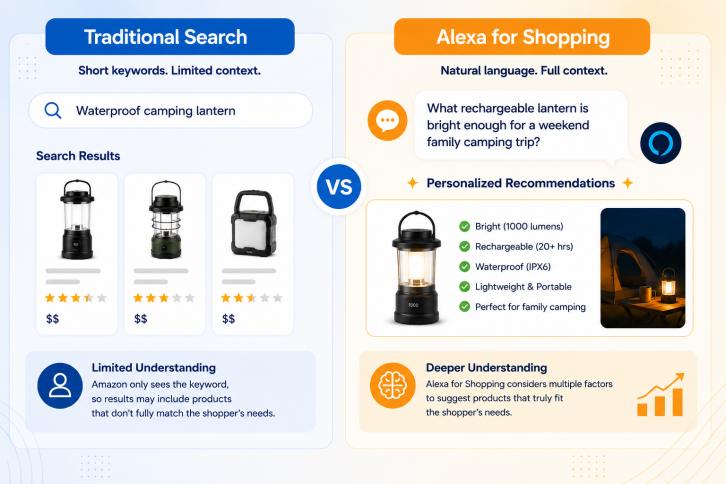
Alexa for Shopping is Amazon’s AI-powered shopping assistant. Formerly known as Rufus, it helps customers discover, compare, and purchase products through natural-language conversations.
Instead of entering a short search such as:
Waterproof camping lantern
A shopper might ask:
“What rechargeable lantern is bright enough for a weekend family camping trip?”
The second search gives Amazon much more information about what the shopper needs. Alexa for Shopping can consider factors such as battery life, brightness, portability, durability, and intended use before suggesting a product.
Did You Know? AI Shopping by the Numbers
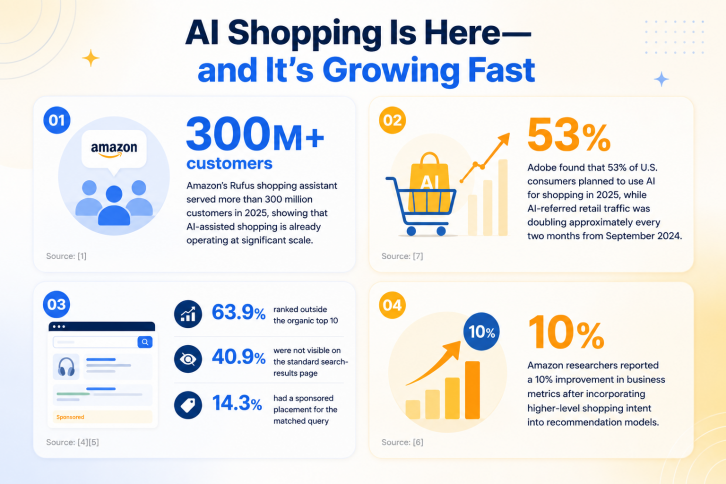
- Amazon’s Rufus shopping assistant served more than 300 million customers in 2025, showing that AI-assisted shopping is already operating at significant scale. [1]
- Adobe found that 53% of U.S. consumers planned to use AI for shopping in 2025, while AI-referred retail traffic was doubling approximately every two months from September 2024. [7]
- A study of 12,810 Alexa recommendations across 1,963 non-branded queries found that 63.9% ranked outside the organic top 10, 40.9% were not visible on the standard search-results page, and only 14.3% had a sponsored placement for the matched query. [4][5]
- Amazon researchers reported a 10% improvement in business metrics after incorporating higher-level shopping intent into recommendation models. [6]
How does Alexa for Shopping affect Amazon Sellers’ Listings?
This changes what makes a strong Amazon listing. Keywords still help Amazon identify and find a product, but they may not provide enough information for its AI to understand when the product is the best recommendation. but they may not provide enough information for its AI to understand when the product is the best recommendation.
For example, a listing that only includes phrases such as:
- rechargeable lantern
- LED lantern
- waterproof lantern
tells Amazon what the product is.
However, a listing that also explains that the lantern:
- lasts up to 20 hours on one charge
- provides enough light for a family campsite
- charges through USB-C
- is suitable for camping, emergency kits, and power outages
gives Amazon more context about who the product is for and when it may be useful.
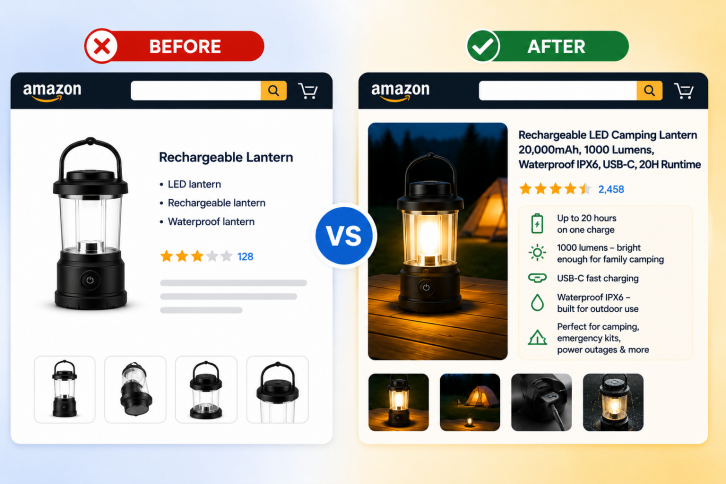
Amazon product discovery is therefore moving beyond simple keyword matching. Sellers should still optimize search visibility, but they should also clearly explain their products’ features, benefits, uses, compatibility, and limitations.
Key Alexa for Shopping Capabilities
| Alexa for Shopping feature | What it does | How sellers should prepare |
|---|---|---|
| Personalized recommendations | Recommends products based on customer preferences, purchase history, and shopping context. | Clearly explain the target audience, product benefits, and intended uses. |
| Product comparisons | Compares similar products using features, prices, ratings, and customer feedback. | Make specifications, benefits, and product differences easy to identify. |
| AI Overviews | Provides summaries in search results to help customers understand product categories and options. | Add clear specifications, compatibility details, use cases, and educational content. |
| Price tracking and alerts | Monitors prices and notifies shoppers when a product reaches their preferred price. | Maintain competitive pricing and respond to meaningful market changes. |
| Shopping memory | Remembers previous shopping conversations and preferences across devices. | Keep product information accurate and consistent throughout the listing. |
| Buy for Me | Can complete purchases from participating brand websites when an item is unavailable on Amazon. | Make product information complete, reliable, and easy for AI systems to verify. |
SEO, AEO, and GEO: Why They All Matter
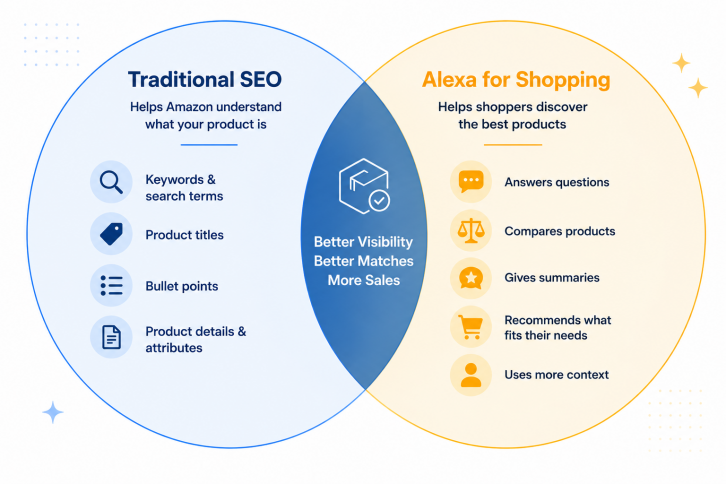
As AI tools become more popular, some people wonder if regular SEO still matters. The answer is yes. This is also true for sellers on Amazon.
Amazon still looks at the words and details in a product listing. These details help Amazon understand what the product is and show it to the right shoppers.
Sellers should make sure their product titles, bullet points, keywords, and other information are clear and correct. and other information are clear and correct.
At the same time, Alexa for Shopping is changing how people shop on Amazon. It can answer questions, compare products, give short summaries, and suggest products that may fit a shopper’s needs.
Because of this, sellers should think about more than keywords. They should also make their listings easy for AI tools to understand.
Amazon says Alexa for Shopping can use information from product listings, customer reviews, questions and answers, other websites, and past conversations.
A good product listing should clearly explain:
- what the product is
- what it does
- who it is for
- when it is useful
- what products or devices it works with
- what it is made from
- its size
- any limits or problems shoppers should know about
- common ways people may use it
Amazon has not shared an exact formula for how Alexa chooses which products to recommend. However, clear and correct information can help both shoppers and AI tools better understand a product.
How to Optimize Your Amazon Listings for AI Shopping
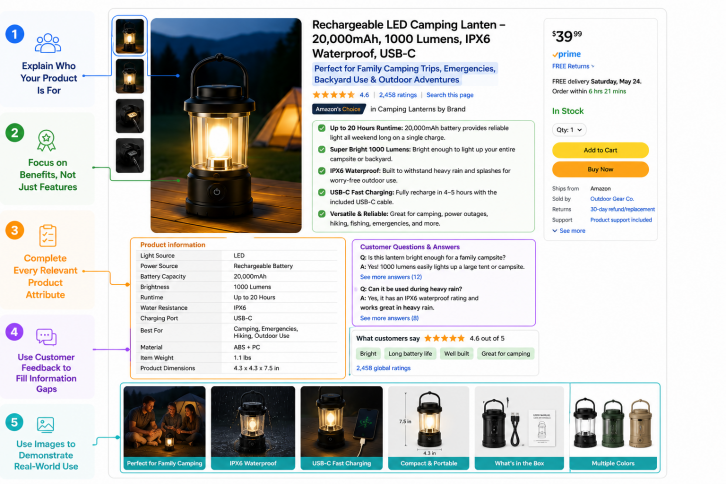
Here are five ways to improve your listings for both traditional search and conversational shopping.
1. Explain Who Your Product Is For
Your listing should clearly identify who the product is designed for and the situations where it performs best.
Instead of describing a product simply as a “rechargeable camping lantern,” explain whether it’s ideal for family camping trips, emergency preparedness, backyard gatherings, or hiking. These details help shoppers make faster decisions while giving Amazon more context for personalized recommendations.
Review your title, bullet points, description, and A+ Content to make sure they answer a simple question: Who should buy this product, and why?
2. Focus on Benefits, Not Just Features
AI shopping assistants are designed to interpret customer intent, so connecting features to real-world outcomes helps Amazon understand when your product is the right recommendation.
For example:
- Feature: 20-hour battery life
- Benefit: Provides reliable lighting throughout a weekend camping trip without frequent recharging.
Similarly, “IPX6 waterproof” means more when paired with “built to withstand heavy rain during outdoor adventures.”
3. Complete Every Relevant Product Attribute
Structured product data plays an important role in helping Amazon categorize and recommend products.
Where possible, complete all relevant attributes, including:
- materials
- dimensions
- compatibility
- power source
- intended use
- indoor or outdoor suitability
- size and capacity
- color and style
These fields may seem unimportant at first because the customer may not see it, but they provide important information for Amazon to complement the info that customers can see in your listing.
Incomplete attributes can make it harder for Amazon to match your listing with detailed customer requests.
4. Use Customer Feedback to Fill Information Gaps
One of the best ways to improve a listing is to look at the questions customers are already asking.
Review sources such as:
- product reviews
- Customer Questions & Answers
- support inquiries
- return reasons
- search term reports
If shoppers repeatedly ask whether a product is compatible with a certain device, suitable for children, or safe for outdoor use, that information probably belongs in the listing.
Likewise, search term reports often reveal the language customers naturally use to describe their needs. Incorporating that language can improve clarity without resorting to keyword stuffing.
5. Use Images to Demonstrate Real-World Use
Images should do more than showcase your product, they should answer customer questions before they’re asked.
Consider including images that show:
- the product in use
- dimensions and scale
- key features
- package contents
- compatible devices or accessories
- common use cases
- material type
- product variations
- close up photos
A good way to tell whether your product images answer customer questions is to review a similar competitor listing.
Ask yourself: What would I have wanted to know from these images that the seller did not show?
AI Is Changing Amazon Advertising Too
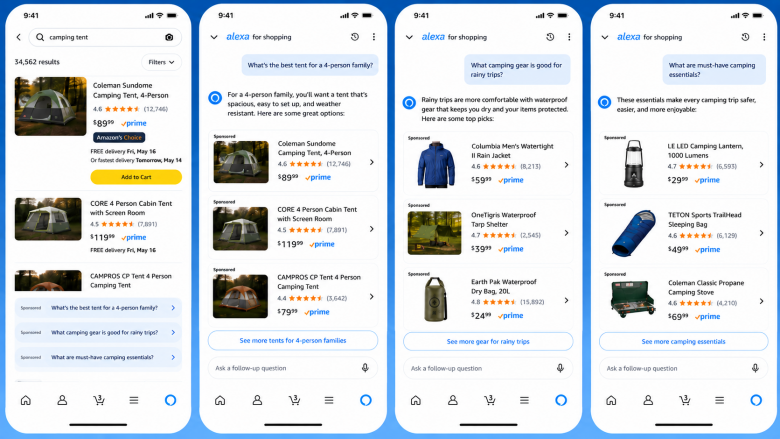
Amazon’s AI is changing more than product discovery; it is also changing how ads are matched to shoppers. Instead of showing ads only in response to keyword searches, Amazon Ads can now display Sponsored Products and Sponsored Brands prompts, which are AI-powered ad extensions to your existing Sponsored Products and Sponsored Brands campaigns. They will be shown across shopping results and Amazon product detail pages; when clicked, these prompts may either launch an Alexa for Shopping dialog or provide a response directly on the page where they appear.
For sellers, this means creating detailed, context-rich listings that clearly explain a product’s features and benefits, helping Amazon’s AI answer potential customer questions more accurately.
Connected Workflows Are the Next Competitive Advantage
A strong listing helps shoppers discover your product, but it’s only one part of the equation. Pricing, advertising, inventory, Featured Offer eligibility, and listing quality all influence one another.
For example, a successful ad campaign can quickly increase sales, but it may also lead to stockouts. Lowering your price may improve conversions, but it can also reduce profit if advertising costs stay high. When these areas are managed separately, it’s easy to miss these connections and react too late.
Connected automation helps bring these moving parts together. Instead of managing advertising and pricing in isolation, sellers can make faster, data-driven decisions across their business.
BQool AI Advertising helps optimize campaigns automatically, while BQool Repricer responds to competitor price changes and helps protect profit margins and buy box ownership. Together, they help sellers align traffic, pricing, and profitability, so every part of the business works toward the same goal.
Frequently Asked Questions
Can Alexa do shopping?
Yes. Alexa for Shopping helps customers discover, compare, and purchase products on Amazon using natural-language conversations. Instead of typing a few keywords into the search bar, shoppers can ask detailed questions, compare products, and receive personalized recommendations based on their needs.
Is Alexa for Shopping the same as Rufus?
Yes. Alexa for Shopping builds on the AI shopping capabilities that were first introduced as Rufus. Amazon has integrated these features into Alexa+, creating a single AI shopping assistant that can answer questions, compare products, and help customers make purchasing decisions.
How should sellers optimize for Alexa for Shopping?
Sellers should go beyond keyword optimization and provide complete, accurate product information. This includes clearly explaining who the product is for, what problem it solves, its key benefits, compatibility, specifications, dimensions, materials, and common use cases. The more context your listing provides, the easier it is for Amazon’s AI to understand when your product is relevant to a shopper’s request.
References
[1] Amazon Ads: What Agentic Shopping Means for Advertising
[2] Amazon: Alexa for Shopping: Amazon’s AI Assistant for Personalized Shopping
[3] Amazon: Amazon Rufus AI Assistant Personalized Shopping Features
[4] Marketplace Pulse: Amazon’s AI Doesn’t Read the Rankings
[5] EcomCrew: Amazon’s AI Recommends Products Your Search Rank Can’t Reach
[6] Amazon Research: Learning to Personalize Recommendation Based on Customers’ Shopping Intents
[7] Adobe Analytics: Traffic to U.S. Retail Websites from Generative AI Sources Jumps 1,200 Percent
The post Alexa for Shopping: How To Prepare for Agentic Commerce appeared first on BQool Blog.
Post Prime Day Learnings: Turn Prime Day Results Into Growth
While most sellers naturally focus on preparation and execution, the period after Prime Day is just as important. This is when sellers can turn event data into practical decisions about which ASINs deserve more investment, which campaigns should receive more budget, and which pricing strategies worked best in the market.
In this article, we aim to guide you on how to review these post-event learnings carefully, so you can keep momentum going and build a stronger strategy for the next major sales event.
Overview
- Quick Answer
- How Did Prime Day 2026 Perform?
- Review Your Prime Day Performance Before Making Changes
- How to optimize your Advertising Campaigns Post-Prime Day
- How to optimize your Repricing Strategy Post Prime-Day
- Prepare Now for the Next Major Sales Event
- What AI Tools Can Help Amazon Sellers After Prime Day?
Quick Answer
After Prime Day, sellers should use their event data to decide what to keep, adjust, and improve. Start by reviewing profit, ROAS, TACoS, conversion rate, Buy Box share, and inventory performance before changing bids or prices. Keep profitable campaigns active, shift budget toward ASINs that converted well, and adjust pricing from discount-focused to margin-focused. Use these post Prime Day learnings to improve your advertising, repricing, inventory planning, and preparation for the next major sales event.
How Did Prime Day 2026 Perform?
Prime Day 2026 showed that shoppers were still willing to buy, but they were more selective and value-driven. Numerator reported that the average Prime Day order size fell to $47.66 from $53.34 in last year’s early read, while average household spend also declined to about $143.45 from $156.37. At the same time, 69% of purchased items were under $20, and more than half of shoppers compared prices across retailers before buying. PMG also found that Prime Day 2026 was a more restrained promotional event than 2025 or 2024, with average discount depth at 20.9% and a smaller share of products carrying discounts. Placer.ai’s analysis of Prime Week traffic suggests that shoppers still responded strongly to compelling deals across major retailers, but their behavior was more deliberate and event-driven.
A clear takeaway is that shoppers are paying closer attention to prices. Numerator reported that more than half of Prime Day shoppers compared prices across retailers before completing their purchases, which shows that buyers are not relying on discounts at face value. Amazon is also making price history easier to check through Alexa for Shopping, which can show 30-, 90-, and 365-day price history. For sellers, this means pricing matters even more. Products that reach the price shoppers are already watching for may be more likely to earn traffic, clicks, and sales.
Review Your Prime Day Performance Before Making Changes
Prime Day also gives you one of the largest sets of business data you’ll collect all year that you can use to reveal patterns that can improve future performance.
Ask yourself:
Which products sold the most? Identify your best-selling ASINs and whether they gained ranking or continued selling after the event.
What prices performed best? Review price changes and Lightning Deal performance to understand which price points attracted the most traffic and conversions.
What were your competitors doing? Look for pricing changes, popular products, and category trends to see how the market responded during Prime Day.
Did you miss sales because of inventory? Check for stockouts, fulfillment delays, or products that went out of stock before demand slowed.
What are customers telling you? Review new ratings and customer feedback to identify common questions, recurring issues, or features shoppers valued most.
How did your business perform overall? Review seller performance, Buy Box share, and product rankings to understand where you gained or lost visibility.
To answer these questions, download reports and compare your Prime Day results with the two to four weeks before the event. Look at key metrics such as revenue, profit, ROAS, TACoS, conversion rate, Buy Box share, and inventory performance. Together, these metrics help you understand whether your growth came from stronger customer demand, better pricing, effective advertising, or simply the increase in Prime Day traffic.
How to optimize your Advertising Campaigns Post-Prime Day
After Prime Day, avoid turning off your advertising too quickly. Instead, use your post prime day learnings to identify which campaigns are still driving profitable sales, which need lower bids, and which should be paused or rebuilt. Shift budget toward ASINs and keywords that converted well, refine targeting with Prime Day search term data, and continue remarketing to shoppers who viewed your products but did not buy. This helps you protect momentum while avoiding wasted ad spend after the event rush slows down.
For a deeper breakdown, read our full guide on Prime Day advertising post-event strategy.
How to optimize your Repricing Strategy Post Prime-Day
After Prime Day, your pricing strategy should shift from chasing sales to protecting profit. Instead of automatically lowering prices to match competitors, review your Buy Box share, remaining inventory, margins, and competitor activity by ASIN. Online arbitrage, retail arbitrage, and private label sellers may need different post-event pricing rules, but the goal is the same: stay competitive without giving away unnecessary margin. Repricers can help sellers manage these changes at scale, especially when pricing rules are based on clear profit floors, inventory levels, and market conditions.
To build a stronger post-event pricing plan, read our full guide for Arbitrage Sellers on post-Prime Day Amazon pricing strategy.
Prepare Now for the Next Major Sales Event
Use your Prime Day learnings to prepare for the next major retail moments, including Back-to-School, Labor Day, Black Friday, and Cyber Monday. In 2026, Black Friday falls on November 27, followed by Cyber Monday on November 30, giving sellers a clear runway to turn Prime Day results into Q4 planning.
Instead of repeating the same post-event work each time, use your Prime Day recap as a planning document. Identify which ASINs showed strong demand, which listings need improvement, and where inventory planning could be stronger before the next traffic spike. The goal is to build a repeatable process, so every major event helps you plan more effectively for the next one.
For more seasonal planning guidance, read our guides on Black Friday and Cyber Monday strategy and Amazon peak seasons.
What AI Tools Can Help Amazon Sellers After Prime Day?
After Prime Day, AI can help sellers turn messy data, ad changes, and pricing decisions into clear next steps they can repeat for future sales events.
For advertising, BQool AI Advertising can help with bid adjustments, budget pacing, keyword harvesting, and ongoing campaign optimization. For pricing, BQool AI Repricer can help sellers stay competitive while protecting profit through AI-powered repricing rules, competitor tracking, price history, and profit-based settings.
With BQool as your selling partner, your post Prime Day learnings can become a stronger system for future events, from Black Friday and Cyber Monday all the way to the next Prime Day.
The post Post Prime Day Learnings: Turn Prime Day Results Into Growth appeared first on BQool Blog.
Amazon Featured Offer Eligibility Is Changing: What Sellers Need to Know
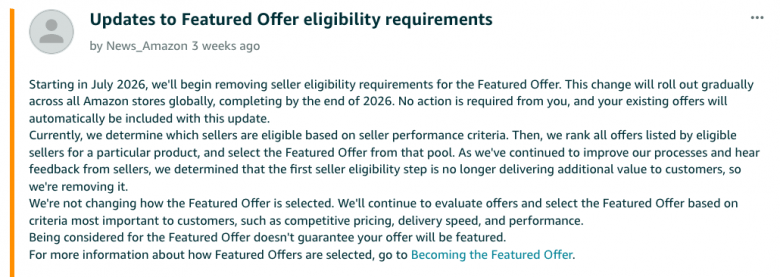
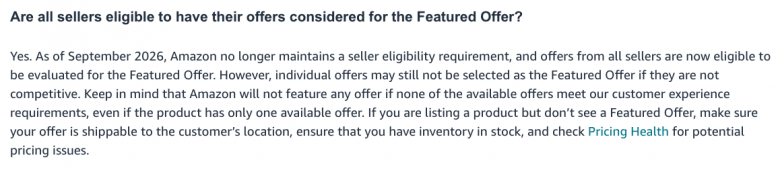
Amazon is removing its seller eligibility gate for the Featured Offer, still widely known as the Buy Box. The change started rolling out in July 2026 and is expected to reach all Amazon stores by the end of the year.
This does not mean every seller will win the Featured Offer. It means every offer can enter the competition. Price, delivery speed, and seller performance will still help determine which offer Amazon features.
Overview
- The 30-Second Summary
- Before the Update: What Made a Seller Eligible?
- What Did Amazon Change?
- What Is Not Changing?
- Why the Change Matters for Pricing
- Why the Change Matters for Amazon Advertising
- Who Could Benefit, and Who Faces More Competition?
- Why Is Amazon Making This Change?
- Sellers Welcome the Opportunity but Question the Details
- Five Actions Sellers Should Take Now
- What Amazon Has Not Explained Yet
- Final Takeaway
- Frequently Asked Questions
The 30-Second Summary
| Before | After |
|---|---|
| Amazon first decided which sellers were eligible. | The separate seller eligibility step is removed. |
| Only offers from eligible sellers entered the ranking process. | Existing offers are automatically considered after the update reaches the store. |
| Amazon then ranked those offers. | Amazon still ranks offers using factors such as price, delivery speed, and performance. |
| Some sellers could not compete at all. | More offers may compete, but consideration does not guarantee placement. |
The simplest way to read the update is this:
Amazon is removing the gate, not the competition.
Before the Update: What Made a Seller Eligible?
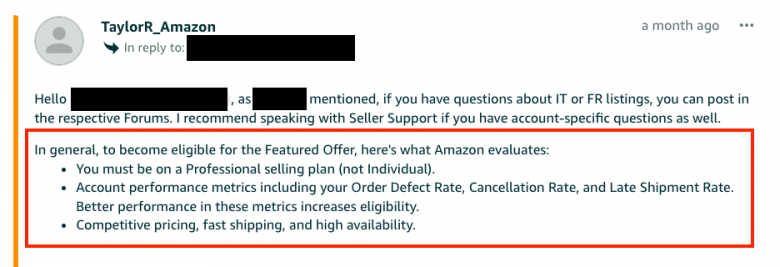
Before the rollout, Amazon first evaluated whether a seller was eligible to compete for the Featured Offer. Its published guidance identified several factors:
- A Professional selling plan rather than an Individual plan
- Account performance, including Order Defect Rate, Cancellation Rate, and Late Shipment Rate
- Competitive total price, including shipping
- Product availability
- Fast and reliable shipping
- Customer service quality
Amazon’s advertising guidance also states that Order Defect Rate should remain below 1%. FBA could improve a seller’s chances by supporting faster delivery and 24/7 customer service, but Amazon did not describe FBA enrollment as a guarantee.
These were not a complete checklist that guaranteed eligibility. Amazon evaluated multiple factors, and sellers with healthy visible metrics could still be found ineligible. The July 2026 update removes this separate seller-level evaluation as it reaches each store. It does not remove price, delivery, availability, or performance from the decision about which offer is featured.
What Did Amazon Change?
Amazon previously used a two-step process:
- It evaluated whether a seller met performance-based eligibility requirements.
- It ranked offers from eligible sellers and selected the Featured Offer.
In its July 6 announcement, Amazon said the first step no longer added value for customers. It is therefore removing that separate eligibility check.
The rollout is not happening everywhere at once:
- US and other Amazon stores: A gradual rollout began in July 2026.
- EU and UK: Amazon set July 20, 2026 as the effective date in its regional announcement.
- Worldwide: Amazon expects the rollout to finish by the end of 2026.
Sellers do not need to enroll or update their offers. Amazon says existing offers will be included automatically when the change reaches each store.
What Is Not Changing?
The update does not remove the factors used to select the Featured Offer.
Amazon says it will continue to evaluate:
- Competitive pricing
- Delivery speed
- Seller performance
Amazon’s current seller guidance also recommends fast and free shipping, a strong customer experience, and reliable stock levels. In other words, a seller with a weak offer does not receive a shortcut to the Buy Box.
The update also does not confirm the end of Featured Offer suppression. Amazon can still decide not to display a Featured Offer when no offer meets its standards, including when it considers a price uncompetitive.
Why the Change Matters for Pricing
Removing the eligibility gate may increase the number of offers competing on some ASINs. Sellers that were previously excluded for seller-level eligibility reasons may now enter the ranking pool.
That could produce three practical changes:
1. Featured Offer share may move more often
An established seller could face competitors that were not previously considered. The effect will vary by marketplace, category, ASIN, and fulfillment setup because Amazon is rolling out the update gradually.
2. A lower price still does not guarantee a win
Amazon evaluates the total offer, not price alone. A cheaper offer may still lose when another seller provides faster delivery or stronger performance.
Cutting prices without checking margin and fulfillment differences can start an unnecessary price war. Sellers need a response based on competitor behavior, not a rule that always races to the bottom.
3. Historical performance needs a fresh baseline
Past Featured Offer win rates were measured under the old eligibility structure. After the update, a change in win rate could reflect a larger competitive pool rather than a sudden failure in your pricing strategy.
Track Featured Offer win percentage, Featured Offer price, sales, and margin at the ASIN level before making broad changes. BQool Repricing Central can help sellers monitor Buy Box performance and adjust prices within their min and max price as market conditions change.
Why the Change Matters for Amazon Advertising
Featured Offer status and Sponsored Ads are closely connected.
According to Amazon Ads, a product must be eligible for the Featured Offer to advertise with Sponsored Ads. Amazon also advises advertisers to choose products that display the Featured Offer when optimizing campaigns.

The removal of the seller-level gate may allow more offers to become eligible for consideration.
For advertisers, the key risk is simple: traffic and conversion data can change when Featured Offer ownership changes.
Private label sellers should watch for:
- A sudden drop in Sponsored Ads impressions
- Lower conversion rates after a Featured Offer loss
- Higher ACoS caused by weaker retail readiness
- Listings with ad spend but unstable Featured Offer status
Do not respond to every performance change by raising bids. First check price competitiveness, stock, delivery promise, and Featured Offer status. Then adjust advertising.
BQool Advertising can automate bid, keyword, and budget optimization, but campaign decisions still work best when paired with healthy listing fundamentals and regular Featured Offer monitoring.
Who Could Benefit, and Who Faces More Competition?
New and previously ineligible sellers gain a chance to compete
Sellers who could not pass the old eligibility step may have their offers considered after the rollout reaches their store. That is an opportunity, not a guaranteed win.
They will still need a competitive price, dependable delivery, good account performance, and available inventory.
Arbitrage and wholesale sellers may see a larger competitive pool
Resellers often share listings with multiple merchants, so even a small expansion in the ranking pool can affect Featured Offer rotation.
The right response is not automatic undercutting. Compare landed price, fulfillment method, delivery promise, feedback, and inventory position before changing a repricing rule.
Private label sellers may get relief from one eligibility barrier
Brand owners have repeatedly complained that they can lose Featured Offer eligibility even when they are the only seller on an ASIN. Removing the seller-level gate may help in cases caused by that step.
But it may not solve suppression caused by Amazon’s competitive pricing checks. A sole seller can still lose the Featured Offer if Amazon decides the offer itself should not be featured.
FBA and FBM sellers still compete on the full customer offer
Amazon’s July announcement does not say that fulfillment method has stopped mattering. Delivery speed and performance remain selection factors, so fulfillment decisions can still affect the outcome.
Avoid reading the update as proof that FBA and FBM offers will now be treated identically in every situation. Amazon has not published the ranking weights.
Why Is Amazon Making This Change?
Amazon gave one official reason: the separate eligibility step was no longer delivering additional value to customers.
Several broader explanations are possible, but they remain analysis rather than confirmed motives.
A single ranking process may be simpler
If seller performance is already relevant when Amazon compares offers, a separate pass-or-fail step may duplicate part of the evaluation. Removing it could simplify the process while keeping customer-focused factors in the ranking.
Amazon has received seller feedback about eligibility
Amazon directly referred to seller feedback in the EU and UK announcement. Forum discussions show recurring frustration from sellers who did not understand why their offers were ineligible.
Regulatory scrutiny provides important context
In 2022, the European Commission made Amazon’s commitments on equal access to the Buy Box legally binding. This makes competition and non-discrimination relevant background, especially for the EU and UK rollout.
However, Amazon has not publicly said that the July 2026 update was made because of that case. Treating regulation as the confirmed cause would go beyond the available evidence.
Sellers Welcome the Opportunity but Question the Details
The reaction in Amazon’s seller forum is mixed.
Some sellers see the update as common sense. Brand owners asked why they could be ruled ineligible on listings where they were the only seller.
Others are cautious. They want to know whether sellers with weaker service records can now win by offering a slightly lower price. Amazon’s announcement answers this only in general terms: performance remains part of Featured Offer selection.
Sellers also asked whether the update would fix Featured Offer suppression linked to competitive pricing. Amazon did not confirm that it would.
The strongest shared concern is not the removal of the gate itself. It is the lack of detail about ranking weights, rollout timing by store, and the boundary between seller eligibility and offer-level suppression.
Five Actions Sellers Should Take Now
1. Record your pre-update baseline
Export at least four weeks of ASIN-level data for Featured Offer win percentage, Featured Offer price, unit sales, margin, ad impressions, conversion rate, and ACoS. Compare it with the same metrics after the rollout.
2. Review repricing rules before competition changes
Check min prices, max prices, ROI or profit safeguards, competitor filters, and fulfillment-based rules. Make sure your strategy can react without creating an uncontrolled race to the lowest price.
3. Separate eligibility problems from offer problems
A removed seller-level gate does not fix every Featured Offer issue. Review competitive pricing, delivery time, seller performance, and inventory when an ASIN remains suppressed or loses share.
4. Connect advertising reviews to Featured Offer data
When Sponsored Ads impressions or conversion rates change, check Featured Offer status before changing bids or budgets. This helps avoid paying more to solve a retail problem with an advertising lever.
5. Test changes by ASIN, not across the whole catalog
The rollout is gradual, and the impact will not be equal across listings. Start with high-revenue or high-ad-spend ASINs, make one controlled change, and measure the result.
What Amazon Has Not Explained Yet
Amazon’s announcement leaves several questions open:
- Which stores have completed the rollout?
- Have the weights of price, delivery, and performance changed?
- Will competitive-price suppression work exactly as before?
Until Amazon publishes more detail, claims about new ranking weights or guaranteed benefits should be treated with caution.
Final Takeaway
Amazon’s 2026 update gives more sellers a chance to compete for the Featured Offer. It does not make the Featured Offer automatic, and it does not remove the need for competitive pricing, fast delivery, strong performance, and reliable inventory.
For sellers, the best response is measurement. Watch Featured Offer share and price first, protect margin with disciplined repricing, and evaluate ad performance alongside Featured Offer status. The gate is going away, but the quality of the offer still decides the race.
Frequently Asked Questions
Is Amazon removing Buy Box eligibility?
Amazon is removing the separate seller eligibility requirement for the Featured Offer. Offers will still be evaluated, and consideration does not guarantee that an offer will be featured.
When does the Featured Offer eligibility change take effect?
The gradual global rollout began in July 2026 and is expected to finish by the end of 2026. Amazon set July 20, 2026 as the effective date for sellers in the EU and UK.
Does seller performance still matter?
Yes. Amazon specifically lists performance, competitive pricing, and delivery speed as factors it will continue to use when selecting the Featured Offer.
Will the lowest-priced seller always win the Featured Offer?
No. Amazon evaluates the total offer. Price matters, but delivery speed, seller performance, inventory, and other customer-focused factors can affect the result.
Does the update end Featured Offer suppression?
Amazon has not said that it does. Offer-level problems, including uncompetitive pricing, may still prevent a Featured Offer from appearing.
How could the change affect Sponsored Ads?
Amazon requires products to be Featured Offer eligible for Sponsored Ads. Removing the seller-level eligibility gate may expand consideration, but actual ad delivery can still be affected by whether the offer wins or displays the Featured Offer.
The post Amazon Featured Offer Eligibility Is Changing: What Sellers Need to Know appeared first on BQool Blog.
How did you get your brand into distributors?
I’m curious how other brand owners approach this.
A few years ago, we reached a point where we had a solid brand online and wanted to expand into offline/international distribution.
The obvious options seemed to be retail or distributors.
We decided to focus on distributors first.
Honestly, I underestimated how much persistence it would take.
For the UK market, it started with one trade show.
Then came roughly six months of weekly follow-ups.
Calls.
Emails.
Samples.
More calls.
More emails.
And yes, we paid for the samples ourselves.
Eventually, we got to the point where we were working with around 90% of the major distributors in our niche in the UK.
The funny part is that I initially thought my English might be a serious problem.
English isn’t my native language, and while I could communicate, I definitely wasn’t some smooth salesperson negotiating deals in perfect English.
But I learned something pretty useful:
You don’t need perfect English to sell.
You need to be able to explain what you’re offering, understand what the other person needs, and — probably most importantly — actually make the next call.
Then another one.
And another.
I think that’s the part people underestimate when talking about distribution.
There usually isn’t one magical email or one perfect trade show that suddenly opens the market.
It’s a lot of boring, repetitive work that nobody sees.
For those of you who have taken an e-commerce brand into wholesale/distribution:
What worked best for you — trade shows, cold outreach, agents, or something else?
submitted by /u/Dependent_Web7403
[link] [comments]
Your software, in two piles
One of our customers pays about $2,100 a month for an Amazon reporting dashboard. They are deciding whether to keep it.
They came to us skeptical. Not politely skeptical, actually skeptical. Then they did something I wish more sellers would do: they put every piece of software they pay for into a spreadsheet, with a column for what actually earns its keep.
That is where the $2,100 line item started looking strange to them.
What that kind of tool actually does
Think about what a tool like that does. It connects to Seller Central, pulls your orders and your ad spend and your fees, cleans it up, and turns it into charts and answers. Buy Box share by ASIN. Which SKUs quietly lost margin last month. Which keywords convert.
That was worth real money when two things were true at once. Getting the data out of Amazon was hard, and reading it required someone who knew what they were looking at.
Only one of those is still true.
The analysis got cheap. The data did not.
The analysis is not the scarce part anymore. If you can hand an AI your actual Amazon data, it will do that work, in plain English, at a level that was a specialist job three years ago. What is still genuinely hard is the data. Amazon’s APIs are a real project. Reports arrive in different shapes and different timezones, fees reconcile late, and the raw feeds do not agree with each other until someone makes them agree.
So that is where we spent our effort. My company, Seller Labs (www.sellerlabs.com), is the connection between your Seller Central and Advertising data and whatever AI you already use. Official Amazon APIs on one end, Claude or ChatGPT on the other, and you ask questions the way you would ask a person.
The honest part
Now the honest part, because I would rather be useful than look right.
That dashboard does things we do not do. It covers Walmart and other marketplaces. We are Amazon only, on purpose, because I would rather go a mile deep on one channel than an inch deep on six. If you sell across three marketplaces, that tool solves a problem for you that we are not solving. That is a real reason to keep paying for it, and I am not going to pretend otherwise.
They have not cancelled anything yet. It is an open evaluation, and it might land somewhere I do not love. I am telling you about it anyway, because the question they asked is the useful part, not the outcome.
The sorting question
Here is that question, and it is worth an hour of your time.
Go through your software line items and separate them into two piles. Tools that do something, meaning they move inventory, run your ads, talk to your customers, file your reports. And tools that mostly exist to turn Amazon data into an answer.
The first pile is safe. The second pile is worth a hard look, because the economics underneath it changed and most sellers have not repriced it yet.
The post Your software, in two piles appeared first on Seller Labs: Amazon Seller Software and Platform.
An Inch of Bubble Wrap Cost Us $30,000 a Year
Amazon measured one of our Hot Wheels two-packs with the ziplock bag stretched out.
That one measurement bumped us a size tier. On 10,000 units, it cost about $30,000 a year.
Nobody flagged it. The Cubiscan measures your box once and bills you forever.
The 90 day window
Here is what most sellers miss: you have 90 days to claim a reimbursement. If you review your fees quarterly, you are reviewing them right as the window closes. A coffee brand we worked with found $20,000 sitting in the same blind spot.
Three places the money hides
- Near-tier SKUs. The 18 inch cliff takes you from $6.97 to $8.27 per unit. At 170 units a day that is roughly $80,000 a year for half an inch of packaging.
- The January 15, 2026 FBA restructure. Graduated price bands changed which SKUs are worth what. If you have not re-run the math since, it is stale.
- Returns, reimbursements, and aged inventory surcharges, at the SKU level rather than the account level where they average out to invisible.
It is margin you already earned
None of this requires selling more. It is margin you already earned.
I broke the whole thing down on the Eleviam Profit Leak Series webinar on August 25, 2026. Thanks to Tom Cochrane and the Eleviam team for hosting, and to the rest of the panel: Silvia Vendraminetto (Ecomm Hero Academy), Jon Tilley (ZonGuru), Andrew Erickson (InventoryHero AI), Ben Kotch (AccrueMe), and Josh Porter (Refund Hawk).
The post An Inch of Bubble Wrap Cost Us $30,000 a Year appeared first on Seller Labs: Amazon Seller Software and Platform.
Transit times suddenly fast
I have sold on Amazon for a number of years. I’ve had automated shipping settings on for several months. Suddenly in the last week I’ve had a few orders come through with transit times of only 2 days and my only option is to use 2nd day air. I’ve contacted Amazon to ask why I’ve having to use expedited services when then buyer elects standard shipping but they just say this is the way automated shipping settings are designed. Makes no sense to me. I can’t continue to have to ship certain orders at this expense. Anyone else experience this?
submitted by /u/dabull23
[link] [comments]
Amazon Ads – Active products not showing when creating a new campaign
Is anyone else having this issue with Amazon Ads?
When creating a new campaign, the Products section shows “There are no available products for your campaign.”
But if I go into an existing campaign → Add products, the exact same ASINs are available and can be selected (so do every other ASINs, it appears for me to select)
I’ve also tried:
- Searching the ASIN manually
- Uploading the ASIN
- Using active listings (existed for years and are already running in other campaigns)
So this is not an inactive listing, new listing or internet issue.
It seems like Amazon’s new campaign builder isn’t pulling the available ASINs correctly, even though the products are clearly eligible and already being advertised.
Has anyone else experienced this recently? Any fix or workaround?
submitted by /u/gosbkk
[link] [comments]
Why do some reimbursement cases get denied even when the seller is obviously right without getting stuck in support loops?
Amazon says some things are the “cost of business”, but why is customer fraud being so easily tolerated on Amazon?
submitted by /u/Digitalarche
[link] [comments]

